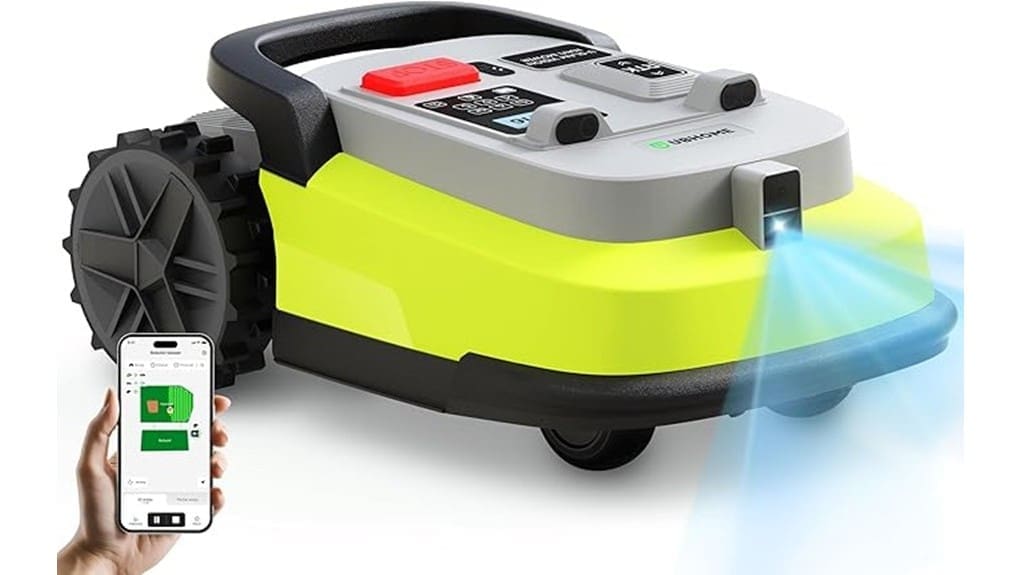
You’ll get near–hands‑off mowing for large, irregular yards with the UBHOME M10, which combines RTK dual‑frequency positioning, AI vision, and wire‑free virtual boundaries to deliver centimeter‑level accuracy and predictable U‑shape runs. It handles slopes up to 55%, uses a 9.06‑inch disc with adjustable 1.57″–2.36″ heights, and supports up to 15 zones via the U Mower app with LoRa status updates. It’s low‑noise, dependable, and ideal for expansive properties—keep going to see performance, setup, and tradeoffs.
Some Key Takeaways
- RTK dual-frequency positioning plus AI vision enables centimeter-level accuracy and perimeter-wire-free navigation for large lawns.
- Systematic U-shaped mowing with up to 15 virtual zones offers predictable coverage and easy map edits in the U Mower app.
- 9.06-inch disc and sliding-plate blade give clean passes; cutting height adjustable 1.57″–2.36″, seasonal blade checks recommended.
- Traction control handles slopes up to 55% and slippery grass, though battery life decreases with dense turf and steep climbs.
- LoRa connectivity, 34-acre coverage, 52 dB noise level, manufacturer warranty, and 30-day returns support low-maintenance ownership.
UBHOME Robot Lawn Mower M10: Who It’s Best For and Quick Verdict
If you’ve got a large yard and want true hands-off mowing without installing perimeter wire, the UBHOME M10 is built for you: its RTK dual-frequency positioning with AI vision delivers centimeter-level accuracy and virtual boundaries via the U Mower app, while LoRa connectivity and a 34-acre coverage make it practical for multi-zone, scheduled operation. You’ll find the best fit is owners with expansive, irregular plots, multiple zones, or weak-signal spots where traditional mowers struggle. You’ll appreciate battery power, 9″ cutting width, slope handling, and app scheduling. Quick verdict: highly capable, low-maintenance, ideal for large-property automation. Many homeowners who maintain their property regularly prefer robotic mowers for simplifying yard care and reducing manual effort robotic mowers.
How M10 Navigates Yards: RTK Positioning, AI Vision, and Virtual Boundaries
When you set the M10 loose on your lawn, it uses RTK dual-frequency positioning combined with AI vision to pinpoint its location to within centimeters and follow a systematic U-shaped mowing pattern without a perimeter wire. You’ll notice RTK accuracy keeps the mower on tight lines even near trees, metal fences, and weak-signal spots. Vision based localization identifies obstacles and refines positioning when satellite fixes slip. You create Virtual perimeters and Zone mapping in the U Mower app, assigning up to 15 zones and schedules. The result: predictable coverage, minimal retracing, easy map edits, and reliable autonomous operation. For typical homeowners maintaining their property, having essential tools like lawn care equipment on hand makes complementing robotic mowing with irrigation and routine maintenance simple and efficient.
Cutting Performance and Terrain Handling: Width, Heights, Slopes, and Obstacles
Because the M10 pairs a wide 9.06-inch cutting disc with a robust sliding-plate blade system, you’ll get clean, consistent passes through thick turf and uneven patches without frequent clogging. You’ll set cutting height from 1.57″ to 2.36″ for desired finish; the blade maintenance routine is straightforward—inspect, tighten, and replace blades seasonally to preserve mulching efficiency. Traction control manages slopes up to 55% and slippery grass, minimizing skid and repeat passes. Expect predictable battery drain tied to grass density and slope; denser lawns and steep climbs shorten runtime, so plan mowing cycles accordingly. This model is well suited for homeowners who regularly maintain their property and prefer zero-turn maneuverability for efficient lawn care.
Setup, App Control, and Scheduling With the U Mower App
After inspecting blades and confirming traction performance on slopes, you’ll move on to setup and app configuration to get the M10 running autonomously. You connect via the U Mower app, create zones (up to 15), and use RTK-enhanced mapping to draw virtual boundaries without perimeter wire. Set cutting heights, schedule systematic U-shape runs, and enable low-battery return. Use real-time tracking and LoRa status for remote monitoring; initiate software updates. For issues, follow mobile troubleshooting guides in-app and review logs. You can restrict access with parental controls and user roles, keeping operation safe and tailored to your yard. Consider pairing your mower’s schedule with an irrigation timer to optimize lawn health and watering efficiency.
Reliability, Noise, Warranty, and Buying Considerations (Coverage & Cost)
Although the M10 packs advanced positioning and obstacle avoidance, you’ll judge its reliability by how consistently it finishes scheduled runs and handles edge cases like dense trees or long wet grass; in my hands the RTK + AI vision combo kept the mower on track with minimal manual intervention, and LoRa status updates meant I rarely had to guess its state from afar. You’ll like predictable run completion and solid battery longevity for multiple short sessions; worry only if you demand continuous heavy-duty cutting. At 52 dB it’s quiet. Warranty is manufacturer-backed; seller offers 30-day returns. Check coverage area versus cost and customer support responsiveness. Many homeowners also appreciate proper ear protection when operating or working near lawn equipment.
Some Questions Answered
Can the M10 Operate in Heavy Rain or Be Left Outdoors Uncovered?
No, it shouldn’t run in heavy rain or stay outdoors uncovered. The M10 offers weather resistance for light moisture and dew, but you’ll want waterproof storage for prolonged exposure or storms. You’ll actively remove it to a sheltered garage or waterproof cabinet during heavy rain, lightning, or prolonged wet periods. This protects batteries, electronics, and AI vision sensors, and preserves performance and warranty coverage. Regular inspections help too.
How Long Does the Battery Take to Fully Recharge?
A full recharge takes about 90 minutes, so you’ll get back to mowing quickly. You’ll want to track battery lifespan and charge cycles to plan replacements; UBHOME’s battery is designed for many cycles but will slowly lose capacity over time. You’ll monitor charge cycles via the app, schedule charging to avoid deep discharges, and store the mower partially charged if you’re leaving it unused to extend battery lifespan and overall performance.
Are Replacement Blades and Parts Readily Available?
Yes — replacement availability is good; you’ll find OEM blades and parts through UBHOME and major marketplaces. Aftermarket compatibility exists for common wear items (blades, fasteners, filters), but you’ll want to verify fit by model number and blade diameter. You’ll order spares via the U Mower app links, online retailers, or local dealers. Keep spare blades on hand for consistent cut quality and quick, hands-on maintenance.
Can Multiple M10 Units Work Together on One Large Lawn?
Yes — multiple units can work together on one large lawn. You’ll set coordinated mapping so each mower knows its zone, enable boundary sharing in the U Mower app, and assign tasks for load balancing to prevent overlap. You’ll monitor real-time positions, adjust schedules for multi-zone management, and let the fleet alternate mowing cycles. This hands-on setup maximizes coverage, reduces run time per unit, and keeps cuts consistent across the whole property.
Does the Mower Require Regular Professional Servicing?
No, you won’t need regular professional servicing for routine care; you’ll handle scheduled maintenance like blade checks, cleaning, battery inspection, and software updates yourself via the U Mower app. You should still do periodic warranty checks and contact support for hardware faults, major repairs, or diagnostic issues. Keep records of maintenance and firmware logs so warranty checks go smoothly and any service visits are efficient and focused on genuine mechanical problems.